
Shala Darpan Staff Login: Step-by-Step Login Guide
The Shala Darpan Staff Login is an online facility for teachers and eligible school staff in Rajasthan. Through the Staff Window, users can access staff-related services and information according to their role and permissions.
If you are looking for the correct Shala Darpan Staff Login page, you can access it directly through the official Rajasthan Shala Darpan portal. This guide explains the login process, required details, available services and important security tips.
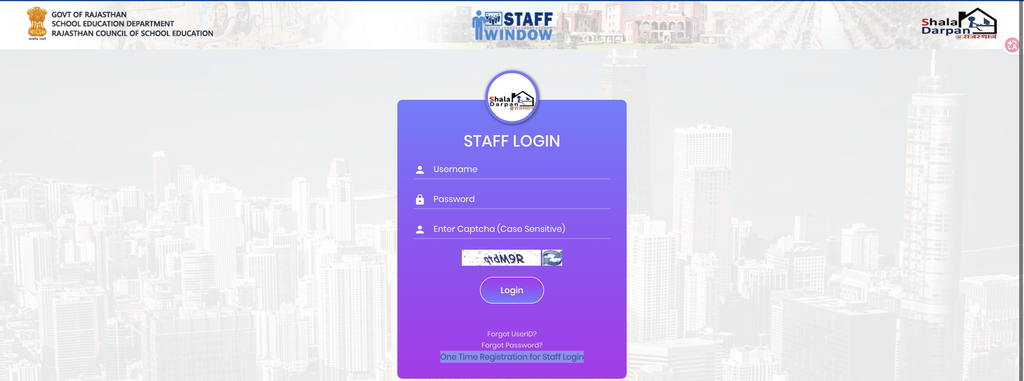
What Is Shala Darpan Staff Login?
Shala Darpan Staff Login provides authorized teachers and school employees with access to online staff services. After logging in, the options available to a user can depend on their role, school and permissions.
The Staff Window may provide access to services related to staff profiles, attendance, leave, transfers, service information and other departmental activities.
Official Shala Darpan Staff Login
You do not need to search through different websites to find the Staff Login page. Use the official direct login page below:
Direct Staff Login:
https://rajshaladarpan.rajasthan.gov.in/sd3/Home/staff/stafflogin.aspx
Official Shala Darpan Website:
https://rajshaladarpan.rajasthan.gov.in/
Before entering your login information, make sure the website address belongs to the official rajshaladarpan.rajasthan.gov.in domain.
How to Login to Shala Darpan Staff Window
Follow these simple steps to access your Staff Window.
Step 1: Open the Official Staff Login Page
Open your browser and visit the official Staff Login page:
https://rajshaladarpan.rajasthan.gov.in/sd3/Home/staff/stafflogin.aspx
You can open the page from a mobile phone, tablet or computer with an internet connection.
Step 2: Enter Your User ID
Once the Staff Login page opens, enter your registered User ID/Username in the required field.
Check the User ID carefully before moving to the next field.
Step 3: Enter Your Password
Enter your valid password in the password field.
Your password should be entered carefully because incorrect login information may prevent you from accessing the Staff Window.
Step 4: Complete the Captcha
If a captcha or security verification is displayed, enter the characters shown on the screen.
If you cannot read the captcha properly, use the refresh option if available and enter the new code.
Step 5: Submit the Login Form
After entering your User ID, password and captcha, review the information and click the Login button.
If your credentials are correct, the portal will process the request and open the Staff Window associated with your account.
What Can Staff Access After Login?
The services visible after login can vary depending on the user’s role and permissions. Staff may find options related to different departmental activities, such as:
- Staff profile information
- Staff attendance
- Leave-related services
- Transfer information
- Transfer schedules and orders
- Staff registration
- School and staff details
- Teacher-related services
- Service-related information
- Other departmental facilities
Not every user will necessarily see the same options because Shala Darpan services can depend on the account type and assigned permissions.
Forgot User ID or Password?
If you cannot remember your Staff Login information, first check the options available on the official Staff Login page. The portal provides recovery-related options where applicable, such as Forgot User ID and Forgot Password. Follow the instructions shown by the official portal to recover your account information. Avoid using third-party websites that ask for your Shala Darpan login credentials. If the problem continues, use the official support or help options available through Shala Darpan.
Common Reasons for Login Problems
Sometimes staff members may have difficulty logging in because of simple issues. Before contacting support, check the following:
- Make sure your User ID is correct.
- Recheck your password.
- Enter the captcha correctly.
- Refresh the page if the captcha is unclear.
- Check your internet connection.
- Try an updated web browser.
- Make sure you are using the official Shala Darpan website.
If the portal itself is temporarily unavailable, try again later.
Important Security Tips
Your Staff Login contains access to staff-related information, so it is important to keep your account secure.
- Always use the official Shala Darpan website.
- Check the domain before entering your password.
- Never share your password with another person.
- Do not enter login details on unknown websites.
- Avoid saving your password on public computers.
- Log out after using a shared device.
- Keep your login information confidential.
The safest option is to access Staff Login directly through the official Shala Darpan domain.
Direct Official Links
For convenience, here are the official links:
Shala Darpan Staff Login:
https://rajshaladarpan.rajasthan.gov.in/sd3/Home/staff/stafflogin.aspx
Shala Darpan Official Website:
https://rajshaladarpan.rajasthan.gov.in/
Use the direct Staff Login page when you already know that you need to access your staff account.
Frequently Asked Questions
Final Words
The Shala Darpan Staff Login makes it easier for eligible teachers and school staff to access their online services. To log in, open the official Staff Login page, enter your User ID and password, complete the captcha and submit the form.
For your account’s security, always use the official rajshaladarpan.rajasthan.gov.in website and avoid entering your login details on unofficial platforms.
Related Posts
Class 5th & 8th Results – Shala Darpan
The Class 5th & 8th Results are available through the Rajasthan Shala Darpan education portal. Students, parents, and schools can use the online system to check examination results and access the available result information without visiting a school office. Shala Darpan provides several education-related services for Rajasthan, including school information, student services, examination-related facilities, and…
Shala Darpan Office Login: Step-by-Step Guide
The Shala Darpan Office Login is an online access facility for authorized education department offices and officials in Rajasthan. It allows users to access office-related services and information available through the Shala Darpan system. The options available after login depend on the user’s role, office and assigned permissions. If you need to access the Office…
Shala Darpan School Search ID: How to Find School ID
The Shala Darpan School Search ID is useful for finding the identification details of a school registered on the Rajasthan Shala Darpan portal. Teachers, school staff and other users may need the school ID or NIC-SD ID when accessing different Shala Darpan services. If you need to find a school’s ID, you can use the…
Shala Darpan Candidate Login: Official Login Guide
The Shala Darpan Candidate Login is an online facility for candidates who need to access candidate-related services through the Rajasthan Shala Darpan portal. The login section allows eligible users to access the services and information available for their application or candidate profile. If you are looking for the official Candidate Login option, it is important…